
Case study · Custom development
Booth registration that runs from your inbox.
Vincent's Promotions puts on craft shows and holiday markets around the Mid-Ohio Valley — dozens of vendors a show, a finite number of booths, and a registration process that used to run on email, phone calls, and paper. We built the system that handles it now: sign-ups, approvals, booth limits, payment links, and reminders, all in one place.

Organizers can approve from your phone
Industry: Events / craft shows
Type: Custom web app
Where: Mid-Ohio Valley (WV / OH)
Status: Live & maintained
The problem
Run on email, phone, and paper.
Several shows a year, dozens of vendors each, and one running question the whole time: how many booths are actually left? Approvals waited on whoever could get to a computer, unpaid vendors slipped through, and the admin around each show was time not spent promoting it.
Nobody knew the real count
How many booths are left for this show? The answer lived in someone’s head and a running tally — and getting it wrong meant overselling the room or leaving money on the table.
Approvals stalled
Approving a vendor meant digging an email thread for their photos, replying by hand, then chasing payment separately — and it all stopped when the decision-maker was away from the desk.

Payment was a side quest
Who was approved, who paid, who still owes — three different places to look, and unpaid vendors slipping through to show day.

Every show started from scratch
Reminders were typed one at a time, and each new show was set up by hand even though last year’s was almost identical.
What we built
One system, from sign-up to show day.
A vendor registration and event-management system that lives on their own website — no new platform, no per-vendor fees. It handles the whole cycle: register, approve, pay, remind.
Approve from your inbox
Every application arrives as an email with the vendor’s photos and two buttons. Tap Approve, confirm, done — from a phone, no login, no dashboard. The vendor gets their payment link within seconds.
Booth counts that count themselves
Total, booked, reserved, and remaining are computed from real approvals and holds, per space type. The system can close public registration or start a waitlist when a space type fills up — and the organizer still has the final say when real-world circumstances call for an exception.

One registration page per show
Vendors pick the show, see exactly what’s left and what it costs, choose booths, tables, and add-ons with a live total, describe their craft, and upload photos of their work.
Payment without a new platform
They already had a Stripe payment form that worked, so approval hands each vendor a pre-filled, price-locked version of it. Paying marks the registration paid automatically — “who hasn’t paid” becomes a filter, not a spreadsheet.

A waitlist that respects the organizer
When a space frees up, promote someone off the waitlist in one click. The system shows the capacity picture and warns about overage — and leaves the call to the person making it.
Next year in one click
Automated reminders before the show and for unpaid vendors, a spreadsheet export per event, a full backup, and “duplicate last year’s show with the dates rolled forward.”
A look inside
Two screens.
The vendor’s registration page and the organizer’s dashboard. Show names and venues are public; no vendor data is shown.
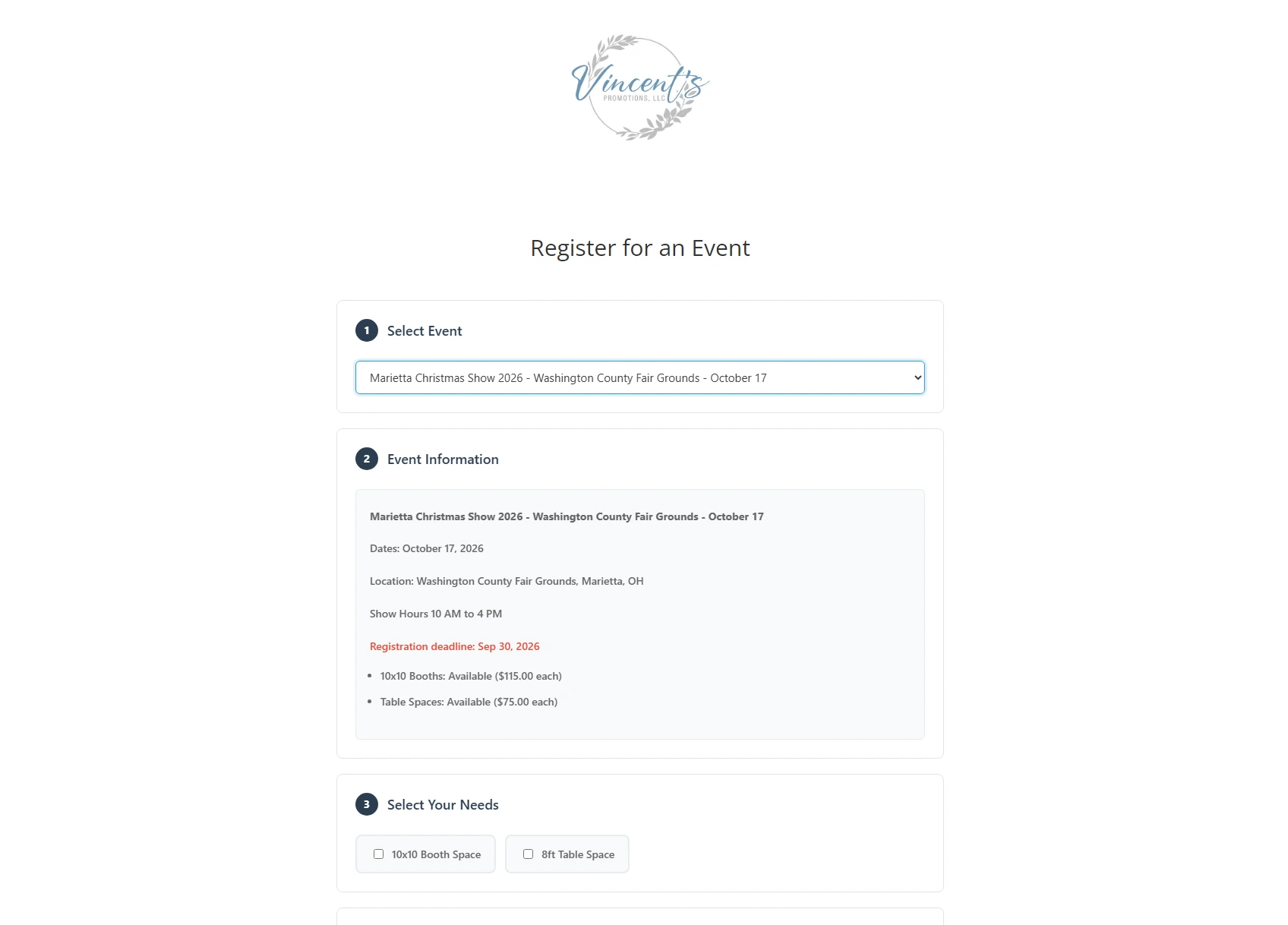
What a vendor sees: one page, pick a show, and every number that used to take a phone call — what’s left, what it costs, when registration closes (in red) — is right there.
The feature that changed their day
A new application lands in the organizer’s inbox with the vendor’s photos and two buttons. Tap Approve, confirm, and the vendor gets their personal, price-locked payment link within seconds — all without logging in to anything. The screen you can’t see here is the one that replaced the phone tag.
Approval takes two taps, from your phone
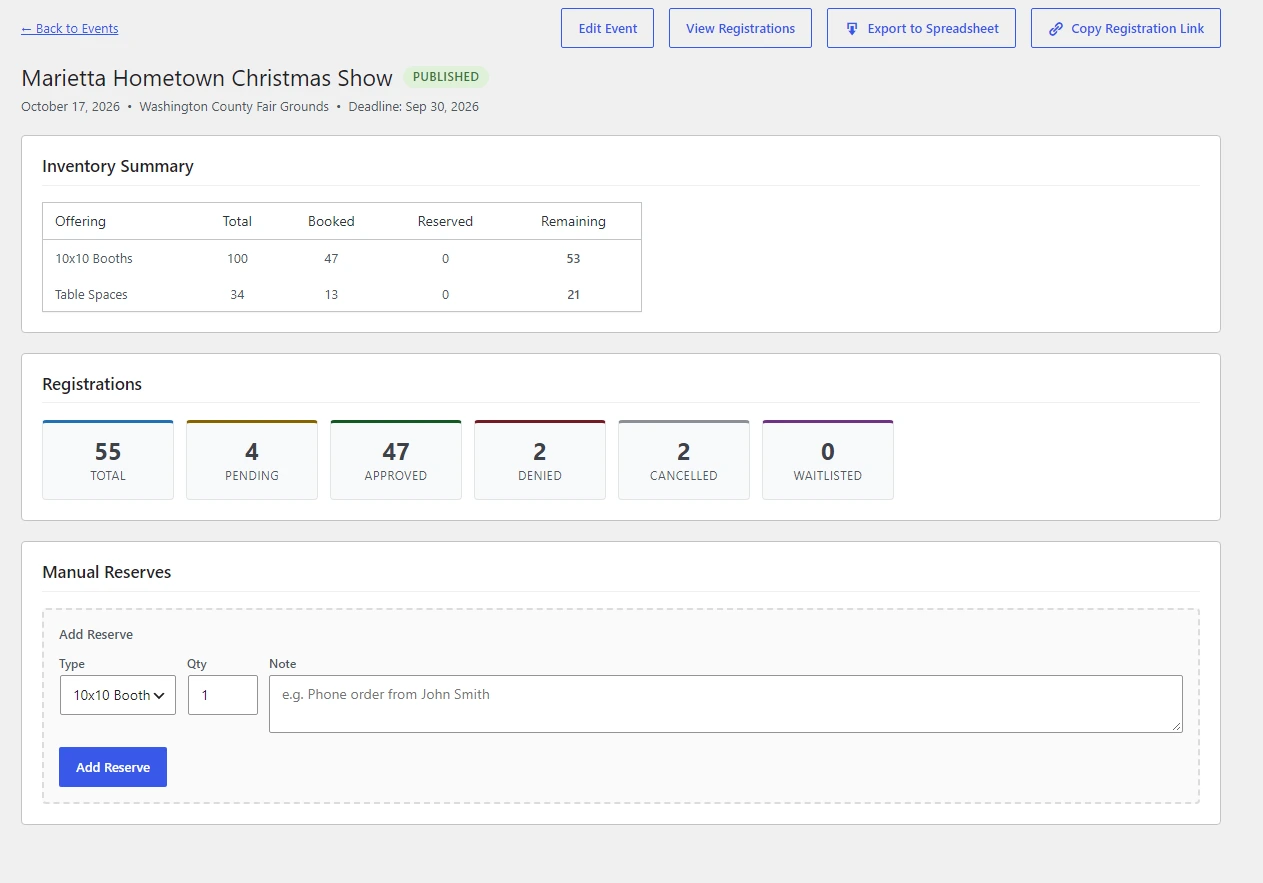
The organizer’s view: booked, reserved, and remaining per space type, every registration sorted by status, and manual reserves for the phone orders that still happen. Shown for one real fall 2026 show.
What we figured out
Where the design actually lived.
The interesting problems weren’t the forms. They were these.
01
Approvals had to happen from an inbox
The person making the call isn’t going to log in to a website every time a vendor applies. So the notification email itself became the tool: photo thumbnails and Approve / Deny buttons. Each registration gets its own secure review link. Clicking Approve or Deny opens a confirmation screen rather than immediately changing anything, which also keeps automated email scanners from accidentally making a decision, and once a registration has been processed the link can no longer approve or deny it. Keeping all of that a two-tap job on a phone was the whole design problem.
02
The waitlist that wouldn’t let go
Our first version kept waitlisted vendors out of the booth count correctly, but it assumed a space had to exist before anyone could be approved. When one opened up, the resend email came through with no Approve button, and the organizer ended up raising capacity and re-registering five vendors by hand. Our wrong turn. The fix was to trust the organizer: every registration gets an approval path, the system shows the capacity impact and warns about overage, but leaves the decision to the organizer.
03
Hiding a control isn’t enforcing it
An electric-hookup add-on was hidden on shows that didn’t offer it — until a styling rule on the site overrode the hiding and showed it anyway, with nothing on the server checking. We fixed the display and, more importantly, made the server refuse the option on any event that doesn’t offer it. Hiding a button is not the same as enforcing a rule.
Judgment
What we chose not to build.
The goal: the simplest thing that actually works
No second payment system
They already had a payment process that worked, so we didn’t replace it. We connected the event system to their existing Stripe payment form and let each tool do the job it already did well.
We didn’t make approvals enforce capacity
The organizer sometimes knows a booth was just squeezed in or a reserve just released. The system informs; the organizer decides.
No vendor logins or accounts
People who do a craft show twice a year shouldn’t have a password to forget. They register, get emails, and pay by a link.
Vendor photos stay out of the media library
They live in an organized folder per show, so a year of registrations doesn’t clutter the site and last year’s booth photos are easy to find.
Eric Nutter and the Slight Revision team listened to our needs, asked the right questions, and transformed Vincent’s Promotions’ paper-based application process into a streamlined digital registration and payment system. The results speak for themselves: registrations increased by more than 50%, while allowing us to reach new artisans and vendors — critical to staying competitive and growing our events.
Dan Swiger
Vincent’s Promotions
Where it stands
How it’s holding up.
The system is live and managing real events, with hundreds of vendor registrations already processed and future shows being prepared in the same workflow. Dan Swiger runs it day to day; we maintain it. It continues to grow by small releases driven by real use — waitlist promotion, payment-aware reminders, pending-application nudges, custom space types, manual reserves, and one-click event duplication were all added because a live season showed they were needed.
+50%
Registrations
Two taps
Approvals
Self-tallying
Booth counts
900+
Registrations processed
Got a job that runs on a spreadsheet and an inbox?
That’s usually where a custom tool pays for itself. Tell us about the task that eats your team’s time before every event, and we’ll tell you whether it’s a form, a plugin, or a build.