
Case study · Custom development
A check-in system fast enough for the door.
CICO is a student check-in and check-out system we designed and built for public high schools in Monongalia County, West Virginia. Students scan an ID at a kiosk on the way in and out; the office runs everything from a clean admin built just for them. It has to be instant, it has to work when the internet doesn’t, and the count has to be right — because a wrong count is a wrong letter home.

The check-in system scans in a blink
Industry: K–12 education
Type: Custom system
Where: Monongalia County, WV
Status: In daily use
The problem
The door is a real-time system.
Hundreds of students come through one or two keyboards between 7:15 and 7:30. Anything slower than instant makes a line, and a line means kids skip the scan — so the system that’s supposed to count attendance quietly stops counting it. The whole brief was: be instant at the door, and never guess.
Speed is the feature
A check-in can’t move at the speed of a page load on school Wi-Fi. When the connection hiccups, the line at the door can’t stop with it.

The count has consequences
Tardy counts drive parent emails and every-Nth-late escalations. A number that’s off by one is a letter home that shouldn’t have been sent.

The door does more than attendance
Friday’s game needs a door that knows who’s banned, who pre-bought a ticket, and which parent has a season pass. Same scanner, different night.

August resets everything
Schools re-roster every year and students come and go all season, so importing rosters and closing out a year aren’t edge cases — they’re the calendar.
Where they started
Two of everything.
Lesson learned: even a good first version earns a rewrite
The original process used barcode scanners and an Excel spreadsheet. It worked, mostly, but a missed or misplaced entry could throw off what came next, and someone had to keep an eye on it. We knew there had to be a better way.
What started as a better way to handle that process has been revised and rebuilt over the years as the schools’ needs became clearer. Today, one system supports three high schools and roughly 4,000 students. But for a long time it was built one school at a time, which meant two of everything — and that was the ceiling we set out to remove:
- Two separate systems meant every improvement had to be built twice — and the two had quietly drifted apart.
- Each scan still made a full round trip to the server, so a hiccup in the connection could slow the whole line.
- The rules that decided on-time, late, or denied were spread across the system, not in one place anyone could point to.
- Adding a third school meant standing up a third copy and keeping all three in sync.
What we built
One system. A dozen small parts.
Last year we rebuilt it from the ground up as one system — everything hand-built as a set of small, cooperating modules, so any piece can be switched off without breaking the rest. The parts worth explaining:

Many schools, one system, no bleed
Every record is tagged by school and by school year. Adding a school changes no code, and each school’s records and administrative access are isolated from the others.

A kiosk that works offline
A few seconds doesn’t sound like much until hundreds of students are using the same door. The kiosk can evaluate a scan immediately and synchronize the activity behind the scenes, rather than making each student wait on the server — and it is designed to keep the line moving even when the connection slows down.

A purpose-built admin
The office runs the whole thing from one clean dashboard: schedule, rosters, special access, reports, notifications. Nothing to wrestle, nothing that looks like plumbing, no clutter.

Independent on purpose
The schools stay in control of their student information. At the beginning of the year, we load the roster and the school-specific rules; at the end, the school receives a complete archive of the year’s activity. It doesn’t need a live connection to the district’s student-information platform to do its job, and it answers to the school, not a vendor.

Notifications as rules, not code
Each school builds its own alerts — late check-in, every Nth late, denied check-out — with its own recipients and wording. Changing a rule never means touching code.

A recap that watches itself
The owner gets one email each morning: warnings first — an unscheduled day ahead, a kiosk holding unsent scans — then the day’s activity, per school.
A look inside
The office view.
The dashboard the front office actually uses — the week ahead, today’s counts, and who’s running late, all in one place.
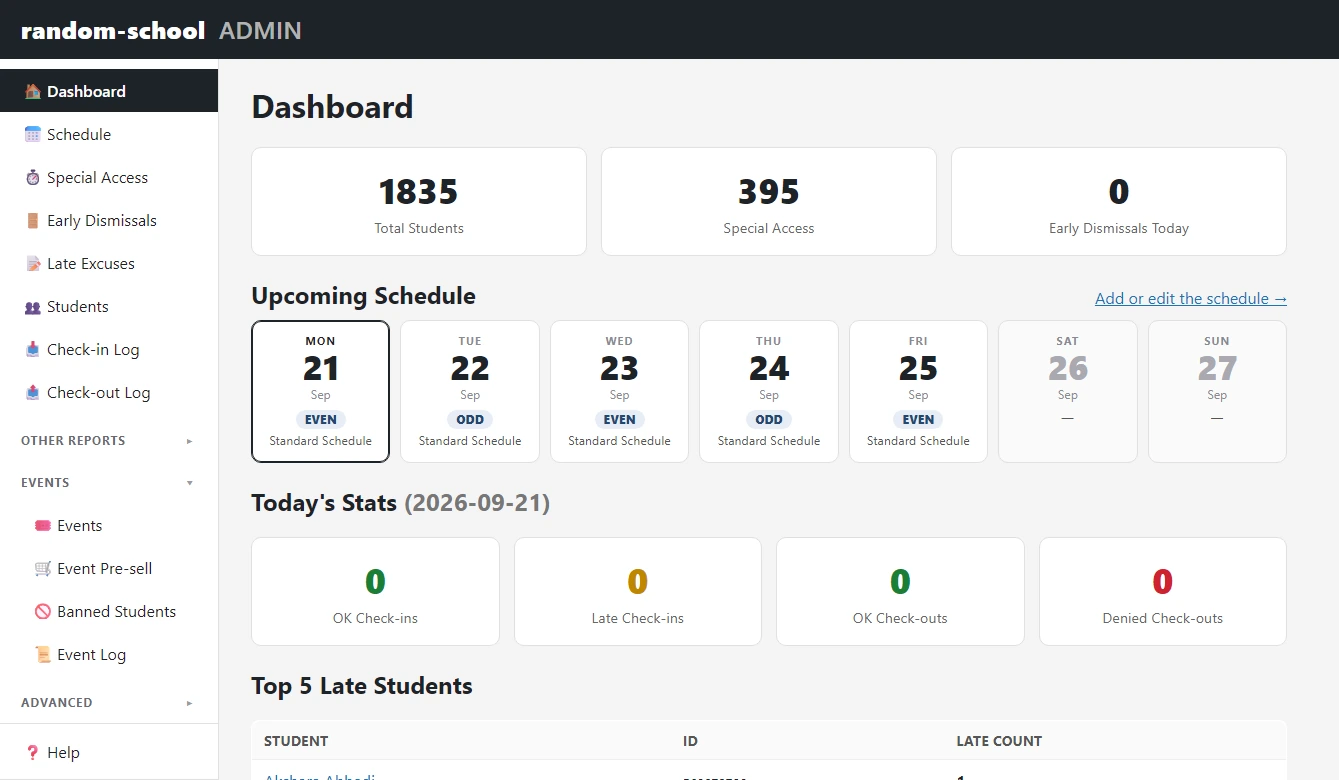
Shown with seeded demo data — a made-up “random-school” and roster, no real students. The live counts read zero because nobody has scanned on the demo.
What we figured out
The bugs we’re not too proud to tell you about.
This is the section most case studies skip. Every real system has a few days it earned its keep — here are the ones worth writing down.
01
The CDN was eating cookies
After go-live, switching the active school in the admin stopped sticking. The CDN was quietly caching pages it shouldn’t and stripping the cookie that remembered your choice. We proved it against the live server with marker headers, moved the source of truth somewhere the CDN couldn’t touch, and added a self-check that reports whether it’s still healthy. The rule we wrote down: a source of truth you can’t correct must never outrank one you can.
02
Special-access times don’t move with the clock
On a two-hour-early day, one group’s check-out shifts 120 minutes and another’s shifts 83, because those times track the bell and lunch schedule, not the clock. Our first, simpler version got this wrong. Now each kind of day carries an exact time map, and the threshold a scan was judged against is frozen onto the record, so later edits never rewrite history.
03
Kiosks were silently hoarding scans
A kiosk kept accepting check-ins that never synced, because a staff session had expired — while the screen still looked healthy. Only a small counter climbed. Now the status light is green only when the kiosk is truly caught up, the count is a button you can press to send, and an expired session announces itself instead of hiding.
04
Two “late” numbers, on purpose
The office’s stored late count and the count you’d get by re-adding every scan can legitimately disagree — because an office correction shouldn’t rewrite what physically happened at the door. Instead of faking one number, the system shows both and says which is which.
Judgment
What we chose not to build.
As we see it, the “no” list is half the job
No data migration
Schools re-roster every year, so dragging old records forward would add confusion, not value. Fresh start; the old system stays as the record for its own years.
No wiring into the county or state student systems
Independence was the point. Files in, files out, on the school’s terms.
No per-teacher logins
Teacher view is one link and one password per school, throttled. Simple is what keeps it from going unused.
No JavaScript framework, no build step
The kiosk has to be trivially debuggable on a Chromebook at 7 a.m.
Where it stands
How it’s holding up.
Today, CICO is actively used across three high schools, supporting roughly 4,000 students and handling more than 100,000 check-ins and check-outs during a school year. The schools share one maintained system while keeping their own rosters, schedules, rules, and records separate. The first Friday football game surfaced a real edge case, and the fix shipped inside a week. It was built to a hard rule — every file small enough to hold in your head — and it is backed by extensive automated and real-world testing as it evolves.
3
Schools
~4,000
Students
100,000+
Check-ins & check-outs a school year
Got something no plugin quite fits?
CICO started as barcode scanners and a spreadsheet. If you’re holding a system together with workarounds — or you’ve outgrown the first version of one — tell us what it needs to do, and we’ll tell you honestly whether it’s a small fix, a custom build, or best left alone.