
Client resources
Email forwarding, and the approval step.
We can forward mail from an address on your domain to another mailbox. Before it starts working, the person receiving the mail has to approve it, once. Here is what that looks like, and why it is a good thing.

Email forwarding: set it and forget it
What it is
One address, delivered somewhere else.
A forwarder takes mail sent to an address on your domain, say info@yourbusiness.com, and delivers it to a mailbox you already read, like your Microsoft 365 or Gmail account. Nothing is stored on our side, and you keep using the inbox you know.
It is handy for role addresses (info@, sales@, billing@) that several people watch, or for an address you want to keep alive without another mailbox to check.

How it works
Four steps, one click.
The only part that needs you is the last one, and it takes a second.
01
You tell us
Which address to forward, and which mailbox it should land in.
02
We create it
We set the forwarder up on your domain in a couple of minutes.
03
The destination gets an email
The mailbox receiving the mail gets a short approval request. It is a plain-looking email, and it is easy to miss.
04
Someone clicks approve
One click on the link in that email and the forwarding starts working. Nothing arrives until then.
The email
Watch for this.
It arrives from no-reply@b.hostedemail.com with the subject "Forwarding request from…". It is deliberately plain, so check your junk folder if it has not shown up.
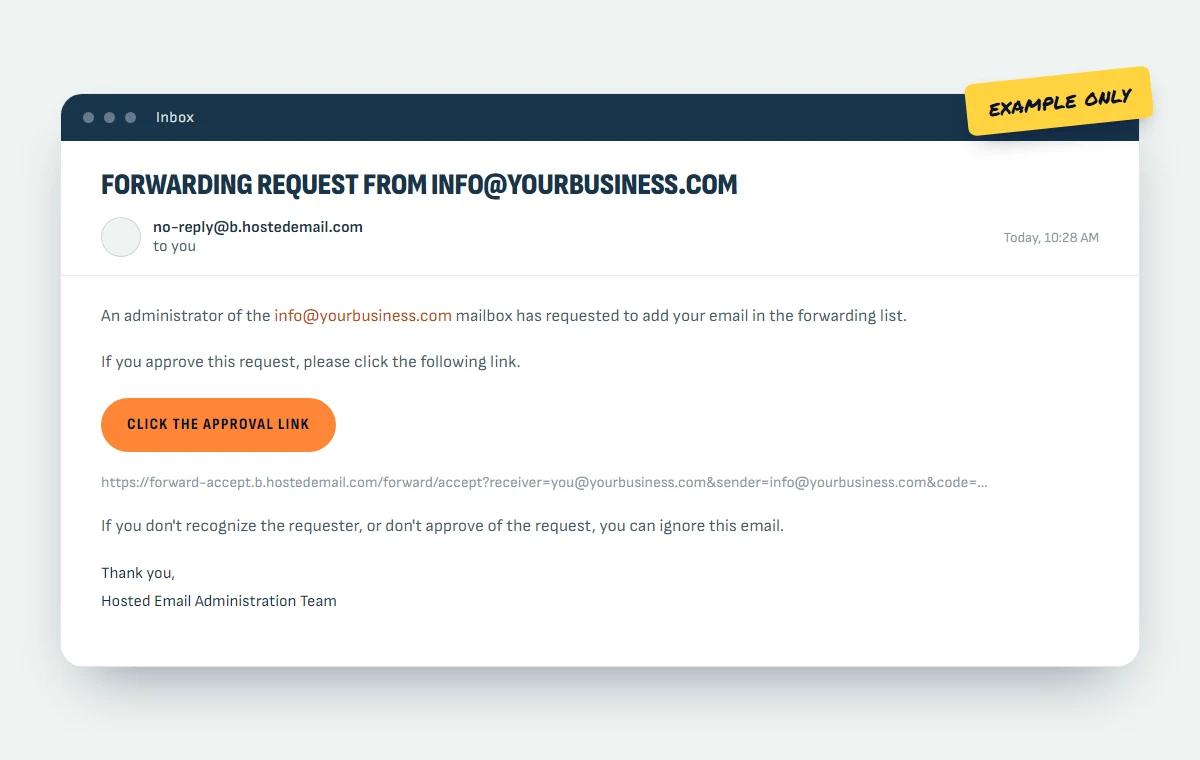
The image above is an illustration, not a real request
Why it works this way
Why the approval exists.
It feels like a hoop to jump through. It is there for good reasons, and every reputable mail provider does something similar.
It proves the recipient agreed
Mail is personal. The only person who can say "yes, send me this" is whoever owns the destination mailbox, so the email asks them, not us.
It stops silent redirection
Quietly forwarding a mailbox elsewhere is a classic move after an account is broken into. Requiring approval means mail cannot be redirected without someone noticing.
It keeps forwarders from becoming spam relays
Without consent, a forwarder can be pointed at a stranger to bury them in mail. The approval step makes that pointless.
It leaves a record
There is a clear moment when the forwarding was approved, and by whom. That matters when staff change or something needs unpicking later.
Good to know
A few caveats.
- Did not expect it? Ignore or delete the email, then tell us. Nothing happens unless the link is clicked.
- Forwarding is not a mailbox. Replies come from wherever it lands, not from your domain address.
- Heavy use is better served by a real mailbox or a shared mailbox in Microsoft 365 or Google Workspace, which we are happy to help you set up.
- Forwarded mail can occasionally be flagged by the receiving provider, since the message arrives by a different route than the sender intended.

Need a forwarder set up?
Email support@slightrevision.com with the address you want forwarded and where it should go. We will set it up and tell you to watch for the approval email.