
Updated September 2026: rewritten with current guidance from ICANN and the FTC, and what to do about it.
Every so often a letter or email arrives that looks like a bill for your website’s domain name. It has your domain on it, a renewal date, a price and a deadline. Very often it is not from the company your domain is registered with at all.
This is usually called “domain slamming” or a domain renewal scam. The notice is not an invoice; it is a sales pitch dressed up as one, written so that you pay it without thinking. Paying it can move your domain to a different company, often at a much higher price, or sign you up for something you never asked for.
What does a domain renewal scam look like?
It looks official on purpose: your domain name, an expiration date, a “renewal term” and an amount due. The FTC has been dealing with these for years; in one scheme it shut down, the agency found that “most consumers who received the ‘invoices’ were led to believe that they had to pay them to maintain their registrations”. Others bill you for a “search engine listing” or SEO service you never ordered, and the FTC’s 2026 small-business alert names domain registration and search engine optimization among the most common fake bills.
How can you tell a real renewal notice from a fake one?
- Check who it is from. Know which company your domain is registered with. A notice from any other company is a sales pitch, however official it looks.
- Read the small print. Many of these letters admit somewhere that they are “not a bill” or are “a solicitation”.
- ICANN never bills you. ICANN, the organization that coordinates domain names, does not send emails directly to registrants about managing their domain names, and never requests payment. Anything claiming to be from ICANN asking for money is fake.
- Know what real reminders look like. ICANN policy requires your registrar to send two renewal reminders, about a month and a week before expiration, from the company you already pay.
- When in doubt, do not use the contact details on the notice. Log in to your registrar account directly, or ask whoever manages your website.
How do you protect your domain?
- Turn on auto-renew and keep the payment card on file current, so the real renewal never lapses (ICANN’s renewal FAQ).
- Ask your registrar for a registrar lock, which blocks transfers you did not request, and turn on two-factor authentication for the account (ICANN’s advice).
- Keep the contact details on your domain up to date, so genuine reminders reach someone who will act on them.
- Keep a note of where your domain is registered and who has the login. It is the single most valuable account your business has online.
Where should you report a scam?
Report fake invoices and renewal notices to the FTC at ReportFraud.ftc.gov. It takes a few minutes and helps them track who is behind it.
We manage more than 400 domain names for our clients. When we manage yours, the renewal notices, real and fake, come to us instead of you: we take care of the real renewals, and the scam letters go straight in the bin. If you look after your own domain, check any notice against the list above before you pay it.
Your domain also sends email on your behalf; our DMARC, SPF and DKIM guide explains how to stop other people sending mail that pretends to be you. For the rest of your website, see what actually matters for small business website security, or look at what our hosting and ongoing care covers.
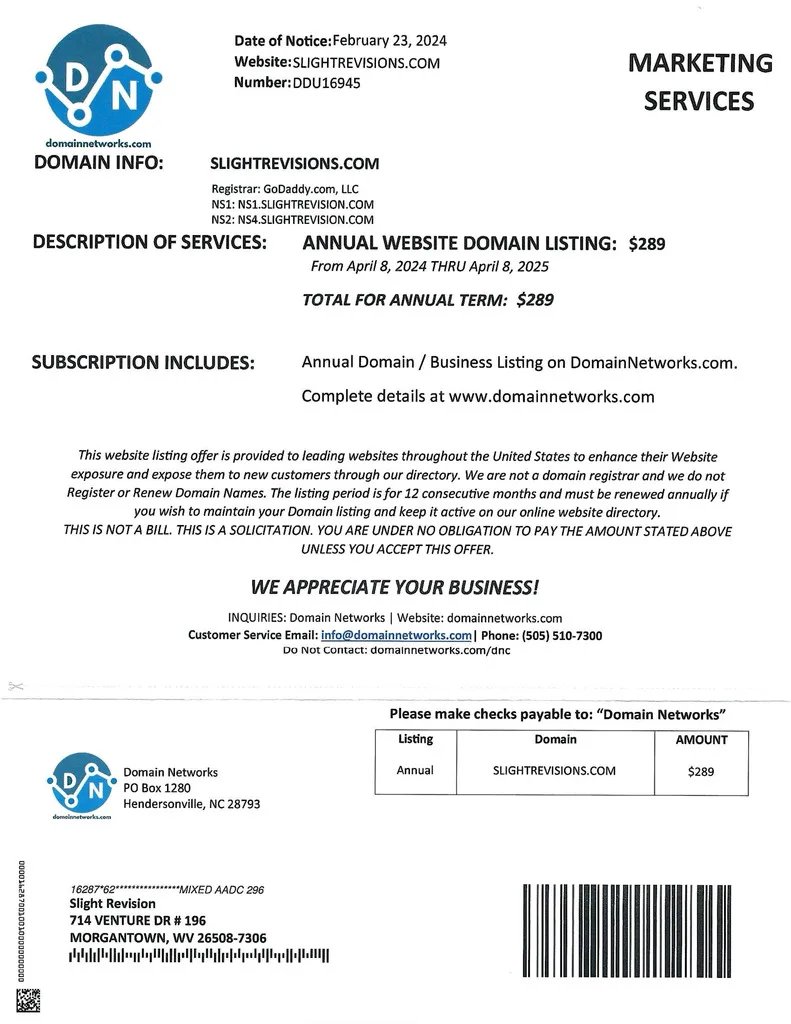
Example scam letter (open the full letter as a PDF). Note the small print: “This is not a bill. This is a solicitation.”